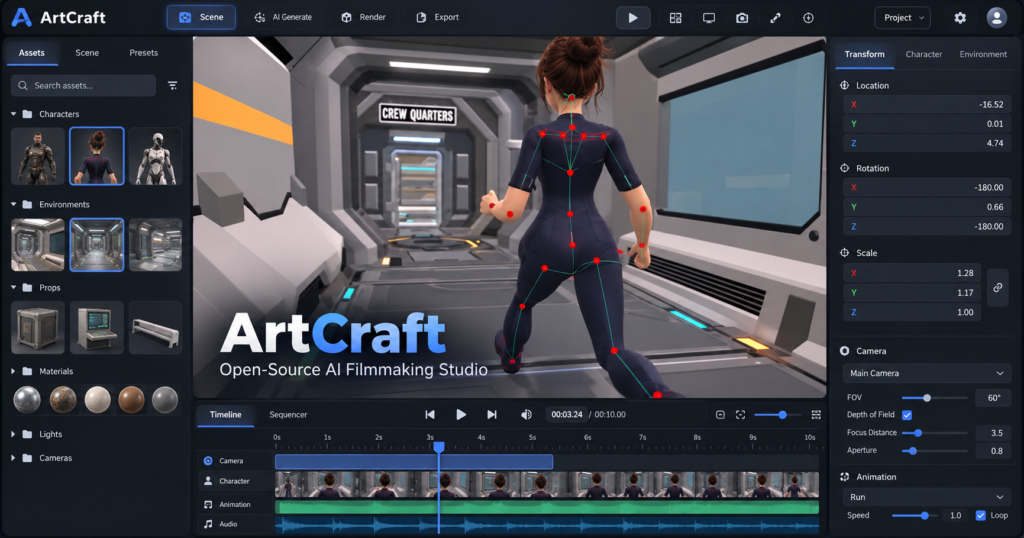
ArtCraft is gaining attention on GitHub for a simple reason: instead of asking an AI model to invent every detail of a shot from a prompt, it gives creators a visual workspace to place characters, build a scene, adjust the camera, and then generate the image or video. The project describes itself as an IDE for artists, combining 2D composition, 3D scene staging, and access to multiple generative AI models.
For filmmakers, designers, and AI video creators, the appeal is greater control before generation. But the distinction between a free, open-source editor and paid model inference matters. Here is what the official repository confirms, what ArtCraft does today, and where it fits alongside ComfyUI and Blender.
What is ArtCraft?
ArtCraft is a visual environment for AI-assisted image and video creation. Its central workflow is to construct a shot using assets, characters, and camera placement, and then use a supported model to produce the final media. In the official ArtCraft GitHub repository, its maintainers describe the product as an interactive crafting tool rather than a prompt-only generation website.
The concept addresses a recurring problem with generative video: a detailed prompt does not always guarantee the position of a subject, continuity of a room, or a specific composition across multiple shots. ArtCraft aims to make those decisions visible and editable before a render is generated.
Key ArtCraft features
- 2D compositing: arrange image layers, cutouts, backdrops, and simple drawn elements on a canvas.
- 3D compositing: position visual assets in a scene with depth to guide framing and composition.
- Character posing and camera setup: establish a subject’s pose and viewpoint before generating an output.
- Image-to-3D mesh: turn an image into a 3D asset that can be positioned and framed in a scene.
- Scene blocking and kitbashing: combine reusable assets to guide the placement of objects and subjects.
- AI image and video generation: generate or edit images, then animate them using supported model options.
These are capabilities documented by the project; they should not be confused with an independent quality benchmark. Some previews and workflows remain under development, and individual model availability can change.
Which AI models does ArtCraft support?
The project’s current README advertises a catalog spanning image generation, video, audio, 3D mesh creation, and generated worlds. It lists image families such as FLUX, Seedream, Nano Banana, and GPT Image, alongside video families including Kling, Veo, Seedance, Sora, and Vidu. For 3D creation, the catalog includes Hunyuan 3D and other providers.
Important: appearing in a model catalog does not guarantee that every model is enabled in the desktop client, free, or available without an account. The official README marks some models as disabled or restricted. Check the exact provider and output costs before beginning a production workflow.
Source: official model list on GitHub.
Is ArtCraft really free and open source?
The application and the generation services are different things. The current GitHub README states that the source code is dual-licensed under MIT or Apache-2.0, with additional third-party notices in the repository. This differs from older indexed copies of the project that described a more restrictive “fair source” arrangement. For licensing decisions, consult the current files in the official repository, not screenshots or older mirrors.
ArtCraft’s official pricing page offers optional subscriptions and credits for hosted generations, and says users can work without a subscription using their own compute and third-party subscriptions. That does not make proprietary video models free, nor does it mean that all supported models can run on a consumer PC. Actual costs depend on the model and workflow.
If you are considering using the source in a commercial product, read LICENSE-MIT, LICENSE-APACHE, and NOTICE before distribution. Model providers, assets, and branding may carry separate terms.
ArtCraft vs ComfyUI vs Blender: where does it fit?
| Tool | Primary strength | Best fit |
|---|---|---|
| ArtCraft | Visual 2D/3D scene composition connected to AI generation | Creators who want to direct shots before generating them |
| ComfyUI | Node-based, configurable generative AI workflows | Technical users building repeatable model pipelines and automation |
| Blender | Comprehensive 3D modeling, animation, and rendering | Artists needing detailed 3D production and animation control |
These tools solve overlapping but different problems. ArtCraft’s emphasis is scene direction and a unified visual creative interface. ComfyUI is valuable when precise control of model execution, node graphs, and automation matters. Blender remains a broad 3D content creation package. ArtCraft is not automatically a replacement for either one.
For a deeper introduction to pipeline-oriented generation, see our ComfyUI automation workflows guide.
How to try ArtCraft
- Open the official ArtCraft website or the GitHub repository.
- Choose the browser app or a supported desktop release. The project’s download information lists stable Windows and macOS builds; Linux users can consult the source-build documentation.
- Start with a simple image composition: one backdrop, one subject, and a clearly defined camera view.
- Try posing the subject or placing assets in 3D before choosing a generation model.
- Check whether the selected model requires credits, a third-party subscription, or your own compute.
- Generate a test result, then adjust the shot layout and compare the output. Repeat with the same assets to assess consistency.
For installers and version-specific notes, use GitHub Releases. Avoid downloading builds from look-alike repositories when the official project has a verified download channel.
A practical test for AI video creators
Imagine a short product advertisement with a presenter beside a table. A prompt-only approach might require repeated generations to get the exact camera angle and the presenter’s position. An ArtCraft-style workflow would first position the presenter, product, background, and camera in a controlled composition, then pass that composition to a generation model. The expected benefit is fewer layout surprises, although the final degree of consistency still depends on the selected model.
We would test it on three consecutive shots of the same character and room, measuring framing stability, character identity, iteration time, and credit consumption. Until that experiment is performed, any claim that ArtCraft produces more consistent video than a competing editor should be treated as a hypothesis, not a verified benchmark.
Limitations and what to watch
- Model access varies: some listed models are marked disabled or restricted in official documentation.
- Generation costs remain: open-source software does not remove the cost of hosted AI inference.
- Workflows are evolving: availability, releases, provider integrations, and interface behavior can change quickly.
- Output quality is model-dependent: strong shot planning cannot guarantee perfect motion, identity, or realism.
The official roadmap includes plans for additional model providers, more controllable scene tools, and reducing dependence on ArtCraft-hosted services. Those are development goals, not features to assume are finished today.
Verdict: a GitHub project worth watching
ArtCraft is interesting because it shifts the conversation from “write a better prompt” to “build a better shot.” For artists who want more intentional framing and repeatable compositions, that could be a useful direction for AI filmmaking. The open source license makes the application especially worth exploring, while paid model access and workflow maturity deserve a careful look.
Our take: shortlist ArtCraft for an actual hands-on test, especially if scene composition is your bottleneck. Keep ComfyUI in your toolkit for node-based generation and automation. We will distinguish verified functionality from promotional demos when evaluating future releases.
Official resources
- ArtCraft GitHub repository
- Official website and downloads
- Pricing and credits
- Release history
- Development roadmap
Editorial note: Based on the official ArtCraft documentation and GitHub repository reviewed on October 12, 2026. This is a documentation-based overview, not an independent hands-on benchmark.